This week was extremely productive and I’m incredibly excited to talk about how I managed to procedurally create a city for our game ‘Late Night Wanderer’. The objective of the game is for players to navigate their way from one section of the city to another, the city needed to change everytime it was generated. For this, I chose to create a maze to represent the path that is able to be taken and generate the city on top of this maze.
Maze Generation
The first task of the project was to generate a maze, there were a few ways to do this but I chose to use Prim’s Algorithm. Prim’s algorithm is a greedy algorithm that finds a minimum spanning tree for a weighted undirected graph, which means that in a graph of weighted nodes Prim’s algorithm sort through unvisited nodes through the path of least resistance/weighting. Firstly, I generate a grid of random numbers:
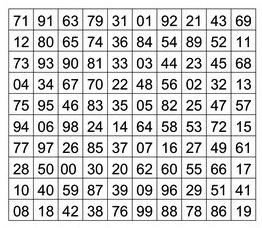
From here I start at a fixed position in the grid such as 0,0, this is the first path of the maze. I then generate the next section of the path by checking every adjacent node and selecting the grid position with the lowest weighting which has no other adjacent nodes. Repeating this until there are no valid adjacent grid positions left gives the following result:

But we’re not quite done yet, implementing this solution gives us what is called a “perfect” maze, which is described as a maze with a single solution and no loops. Now what we want in a city is generally something more interconnected and with less dead ends. So the solution was implemented by connecting some of the current paths which have a blank space next to each other. So how do we do this? When generating the maze we add all of the path grid positions into a list, and iterate over that list and check if any of the adjacent grid positions in that list is adjacent to another path in the list and connecting them together. This could be controlled to only connect a number of paths or if there are multiple connections in the path, this generates the following result:

From a Maze to a City
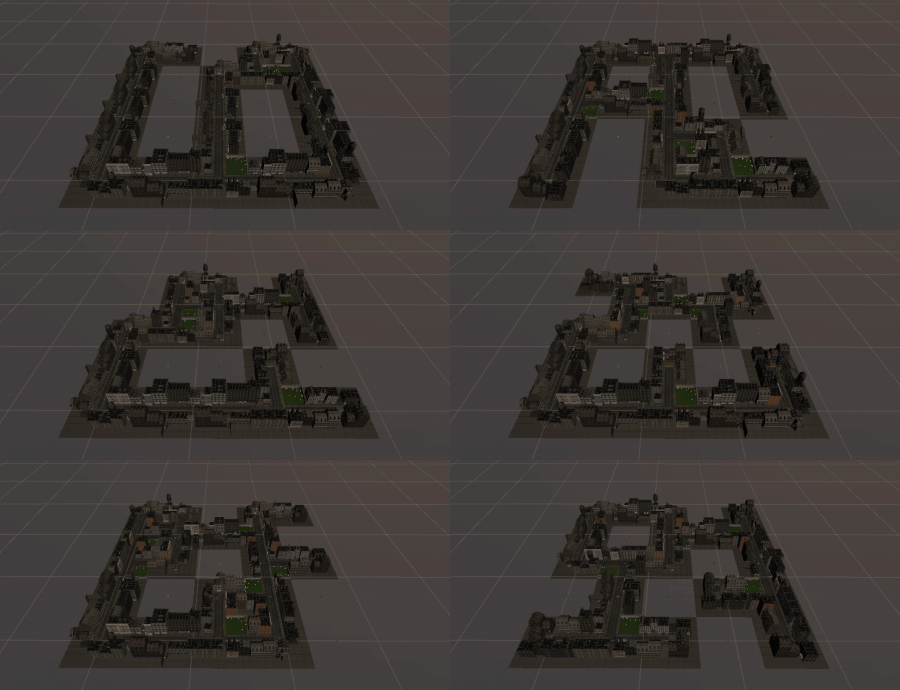
So now we have a maze and a path list, how do we change this into a city and world? The option we chose was to generate the city from chunks, these chunks would have a road that connects and represents the path. This means that we would have to have at least 5 different types of chunks, dead ends (single exit), turns (two exits), straights (two exits), t intersections (three exits) and four-way intersections (four exits). We can do this by iterating through the path list and checking which of the adjacent nodes are in the path list, and from this chunk, data can be created that stores the location, type, and rotation of the chunk. Finally, the last step is to load in the chunk that is relevant to the data type stored and rotate it appropriately. For our project, we connect each chunk through roads and therefore ensure that each chunk type has the correct road type.
What Now?
I was extremely happy with how this section of the project has turned out and the different results that it gives. I realised that there are many different possibilities for this as a maze or world generator, such as having chunks which represent a dungeon and being able to easily create a dungeon maze. What I want to work on now is to create a unity asset package that includes this modular maze system where the user can import in their own chunks and generate a world that they want.

Leave a reply to Studio 2 Presentation – Me, My Blog and I Cancel reply