In this Dev Diary, I’m going to do something a bit different this time and do more of a research blog about possible interesting topics to discuss.
Photogrammetry
Video games are becomingPhotogrammetry is a technique to create photo-realistic 4K virtual world inside a video game engine. Here are some example screenshots of environments created by Sweden-based artist Rense de Boer using photogrammetry and Unreal Engine:


The process behind photogrammetry is basically, taking an enormous number of photos of real objects and locations, and then using data from those photos to build landscapes and 3D models. 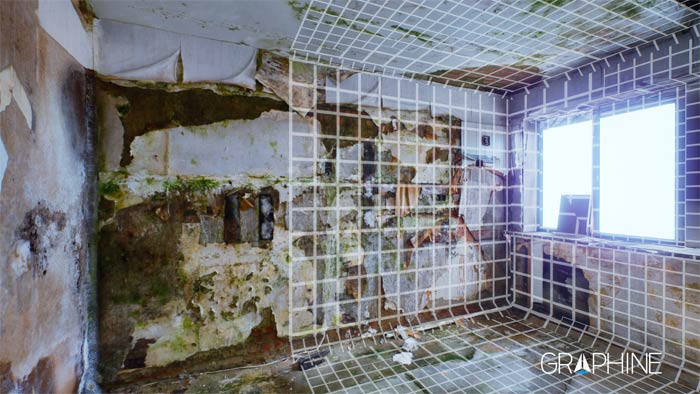
After taking photos that cover all the sides of an object, an algorithm can be used to reconstruct a detailed 3D representation of that object. First, the algorithms create a 3D point cloud from the aligned photographic images, and from there a 3D mesh is generated for rendering in real-time. Finally, the original images are projected back on the mesh to get ultra-detailed textures. This technique has actually started to be adopted by game developers to create entire environments, an example of this is EA and their recently released game Star Wars Battlefront. They used some of the original Star Wars models to import and imprint as high-res 3D models in their game. If you want to see some more photogrammetry, you should definitely check out Rense De Boer’s artstation page.
Visual Scripting
My university teacher gave me the task to have a look into something called “visual scripting” which is being able to achieve things normally achieved through scripting using other tools or without writing a single line of code.
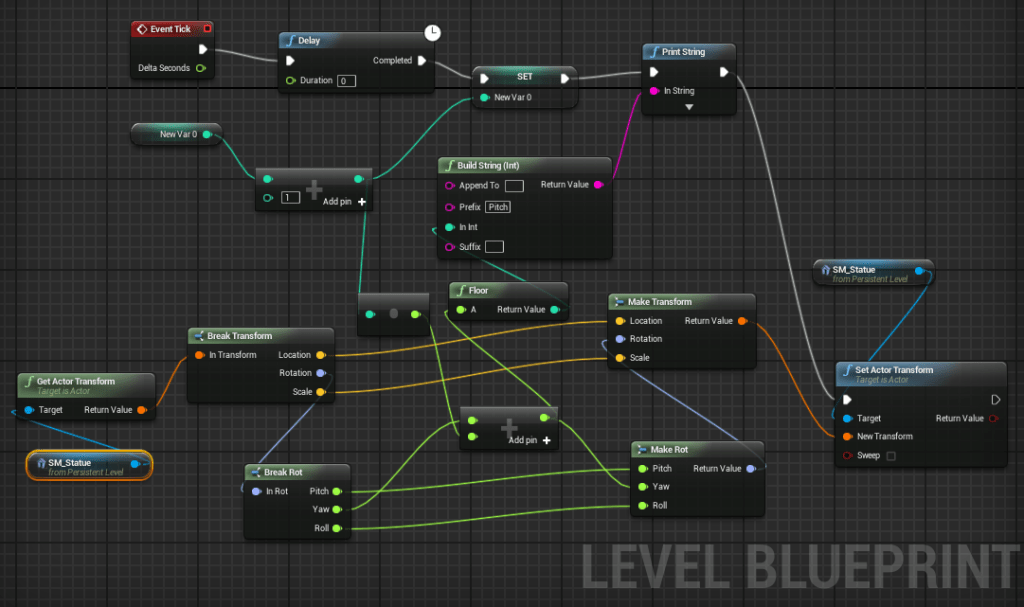
Blueprints – Unreal Engine
The Blueprints Visual Scripting system in Unreal Engine is a gameplay scripting system based on the concept of using node-based interface to create gameplay elements from withing the Unreal Editor. This system is extremely flexible and allows designers to use the concepts and tools usually only available to programmers without writing a single line of code.
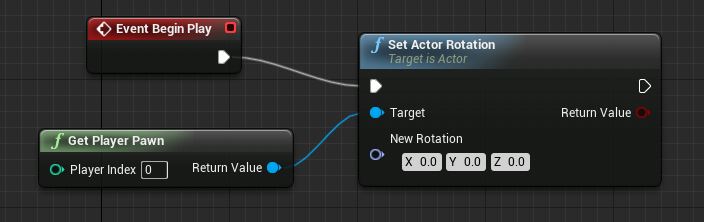
You can see above that blueprints have multiple equivalents as can be seen from the above image. The red node is representative of an event, and so when something happens the event can be called to begin a string of blueprint nodes. The green node represents values or variables that can be extracted from the game, these can be used as inputs into functions or used to update the values. The blue node is a function node where there are multiple different types of node functions and this one is “Set Actor Rotation” which refers to the rotation of a gameObject identified by “Get Player Pawn” node that returns an actor. This is a simple rundown of some of the basic nodes that are used in blueprints in Unreal Engine 4.
Unity Scripting Tools
For Unity, there isn’t a visual scripting program that is created by unity for the editor itself. However, there are still a number of options available for users to use visual scripting in their game, some of these are:
References
Photogrammetry in games – http://graphinesoftware.com/our-technology/photogrammetry-games
3D Scanning for Video Games – http://graphinesoftware.com/blog/2014-12-18-3d-scanning-for-video-games
These aren’t photos… – https://petapixel.com/2016/03/29/arent-photos-theyre-virtual-shots-video-game-engine/
How we used Photogrammetry to Capture Every Last Detail for Star Wars Battlefront – http://starwars.ea.com/starwars/battlefront/news/how-we-used-photogrammetry
Understanding Blueprint – https://www.pluralsight.com/blog/tutorials/become-familiar-blueprint-visual-scripting-unreal-engine-4

Leave a comment